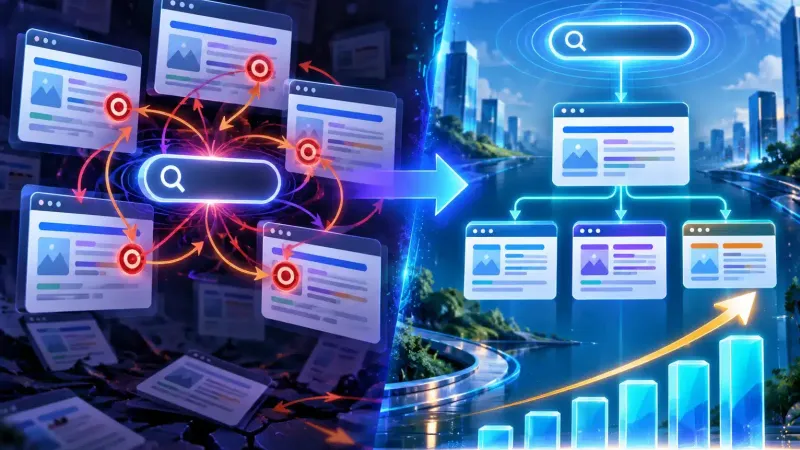
Plenty of business owners publish articles regularly, yet their traffic stays flat. Usually the content is fine; the problem is that the internal links on the website have never been organised. Internal linking is one of the lowest-cost SEO tasks there is: you do not need to buy backlinks or add ads, you only need to tidy up the links between pages you already have.
Put simply, an internal link connects one page to another page on the same domain. Unlike links from outside sites, internal links are entirely under your control. That is why the results can show within weeks rather than months.
Why internal linking matters for a business website
There are three main reasons. First, internal links help Google find and crawl your pages. Research summarised by Rankability (2026) says that pages four or more clicks from the homepage tend to be crawled less often than pages close to the homepage. Pages that are rarely crawled are naturally slower to appear in search results.
Second, internal links pass authority. Strong pages such as your homepage or a popular article can “lend” their strength to the service pages you want to push. Third, internal links guide readers. Visitors who find something else to read stay longer, and the chance that they contact you goes up.
The problem is often bigger than people expect. On sites with many pages, orphan pages (pages with no incoming links at all) turn up fairly often, and tidying up the link structure helps Googlebot reach more of your pages. That potential often goes to waste.
7 proven ways to organise your internal links
1. Map your money pages first
Work out which pages bring in the most business: service pages, product pages or the contact page. These pages should receive the most internal links. List them in a simple spreadsheet so you know where all your links should point.
2. Keep important pages within three clicks of the homepage
As a rule of thumb, important pages should not be buried too deep. If visitors have to click five times to reach a service page, search engines will struggle too. Fix this through the main menu, links on the homepage and internal links inside articles.
3. Use descriptive anchor text
Anchor text is the clickable text. Avoid “click here” or “read this”. Use a phrase that describes the destination page, for example on-page SEO techniques that work. Vary the wording, because when every anchor uses exactly the same phrase it looks unnatural.
4. Build a path from articles to service pages
Educational articles usually bring in new readers, while service pages close the sale. Connect the two. Each article should have at least one internal link to a relevant service page, placed naturally in the middle of the discussion rather than piled up at the end.
5. Fix orphan pages and broken links
Check regularly for pages that have no incoming links at all. You can do this with the indexing report in Google Search Console. At the same time, clean up links that point to 404 pages, because broken links waste opportunities and frustrate visitors.
6. Group content by theme
Gather articles on similar themes and link them to each other. For example, all your articles about local search can link to one another and lead to a main guide such as our guide to getting a local business on Google Maps. This pattern strengthens topical signals and makes Google more confident that your site is an authority on the subject.
7. Maintain your links regularly
Every time you publish a new article, add links to it from two or three relevant older articles. This small habit stops new articles from being isolated. Run a full audit every three months so your link structure stays healthy as your content grows.
Common internal linking mistakes
- Too many links in one paragraph. Readers get confused and each link is worth less. Spread them out sensibly, roughly one link every 150–200 words.
- Identical anchor text everywhere. It looks forced. Use synonyms and varied phrasing.
- Linking to unrelated pages. Relevance matters far more than quantity.
- Ignoring mobile. Indonesia's internet users keep growing (the 2026 APJII survey puts penetration at 81.7%) and most of them go online through a smartphone, so make sure links are large enough and easy to tap.
- Forgetting old pages. Older articles that are still good deserve to be linked to new content again.
Internal linking and your wider SEO strategy
Organising your internal links does not replace other strategies; it is the foundation that helps them work better. When you run a link building strategy, authority from outside spreads more evenly if your internal link structure is already in order. Without that, expensive backlinks are wasted when their strength stops at a single page.
The context makes this more relevant than ever. With 235.26 million internet users in Indonesia in 2026 (APJII) and many Google searches having local intent, competition for the first page keeps getting tougher. A well-structured website has a real advantage, especially when combined with good content and fast loading.
How to measure the results
Once you have tidied up your links, you need to know whether the work is paying off. There are three simple indicators you can track without expensive tools. First, the number of indexed pages in Google Search Console, which usually rises first because crawling becomes more efficient. Second, the average position of the destination pages you have given more incoming links. Third, pages per session in Google Analytics, which shows whether readers actually follow the paths you have set up.
Record your starting point before you change anything, then compare after four and eight weeks. With a clear baseline, you can confirm that the gains come from internal linking rather than from a seasonal swing. If one of your destination pages still does not move, the problem is probably the content quality or keyword competition rather than the link structure. You can then decide the next step calmly, for example by deepening the article or adding internal links from stronger pages.
Where to start today
If you are just getting started, take your five highest-traffic articles and add one link from each of them to your main service page. It takes less than an hour, but the impact often shows within two to four weeks. After that, move on to the next pages step by step.
If your business website already has dozens of pages and you are not sure where to begin, the Webzoo team can audit the structure, reorganise your internal links and fix other technical SEO issues at the same time. The consultation is free, and you will get a clear picture of which pages to fix first. Tidying up internal links is a small investment with a long-lasting effect, so there is no reason to put it off.
References
- Rankability: Are Internal Links a Google Ranking Factor? Complete 2026 Guide
- ANTARA News: APJII survey finds Indonesia's internet penetration reached 81.72% in 2026
- Digital Applied: Internal Linking Strategy 2026: Large-Site SEO Guide
- Qwords: Local SEO 2026, a last-mile conversion strategy for small businesses